Blogg
Här finns tekniska artiklar, presentationer och nyheter om arkitektur och systemutveckling. Håll dig uppdaterad, följ oss på LinkedIn
Här finns tekniska artiklar, presentationer och nyheter om arkitektur och systemutveckling. Håll dig uppdaterad, följ oss på LinkedIn

It’s tempting to hand out a bunch of Claude licenses together with some guidelines, and expect efficiency gains. The better way is to codify the agent process so that the engineers of all skill levels can start using agents to create sustainable business value, and not just AI slop.
In my article The new team I wrote about how to think about your agent as a team member. Here I apply the learnings and practices from my time as engineering manager of people, to AI agents; give them a goal, clear scope, the right tools and guardrails. I will show how to codify and unify agentic work for projects and teams.
I have been on the journey from getting “intelligent” code completion with CoPilot, to playing with ChatGPT 3.5 to generate text and images, to the frustration of writing apps with early versions of Cursor (fix one bug, resurrect another), to Claude Code paired with models that actually produced capable code. Now, instead of creating an excel sheet to figure out which EV is right for me I will prompt my own web app to figure it out. That works well for one-offs personal projects that I probably won’t maintain over time, I had no need to go back and update the app once I had decided which car where right for me.
The forces on applications that supports a business are different, code needs to be sustainable to be able to evolve with the business.
Just getting a license of Claude Code to build applications using agents felt ad hoc to me. I write a prompt and magic delivers code that solves the problem, just realize later in the PR comments that the code is not following the coding guidelines and style for the project. Learnings and continuous improvements were easily missed when starting a new AI agent session and there was not a natural way to share learning to the team. Then there is no way to get onboarded in a consistent way, just install Claude Code is not onboarding. I saw scattered usage in the team, some people use agents all the time, but each in their own way. Others did not use agents at all, they don’t trust them or didn’t have any interest in using them at all (as they take away the fun of problem solving).
I want to create an agent harness that made it easy to do the right thing, to be compliant with the guidelines and follow agreed upon practices. I wanted to go from the need to read policy documents to having the guardrails and policies built into the process. When the guidelines and best practices are codified and automated into the AI workflow and tools it takes away cognitive load and I can focus on the problem. And the code will look consistent between people and models. An added benefit is that it becomes easy for an auditor to validate applicable practices are followed.
A harness is all the stuff that is not in the model, the code and files that allows you to interact with the model. Claude Code, CodeX, Open Code are agent harnesses. They manage the chat history, constructing the context from agent.md and skills and manage the use of tools like bash. Together with a model it becomes an AI agent.
To get away from the ad hoc use of AI agents, I wanted to build a harness that mimicked the pipeline I use when delivering code, i.e. my local pipeline. I want the code to pass the PR review with minimal comments and the external CI/CD pipelines to pass. The code from the AI Agent should compile, have no linting problems, correct test coverage and following project guidelines and patterns.
I had one additional requirement, it should be easy for an agent to take up work and continue work even when I started in a new session, each session is a fresh one. Not having access to chat history led to memory and context management, context engineering. Unifying memory and context into the repo and harness means that starting new sessions is now preferred over continuing in a session. I can switch from Claude Code to Codex without losing context, i.e. move the work between different agents when running out of tokens in one for example.
I decided to use a planner-worker pattern. The planner agent takes the problem prompt and code base to figure out what needs to be done, not how, and creates a plan with tasks. After approving the plan the harness then starts off a local implementation pipeline for a small scoped task, just like a story task.
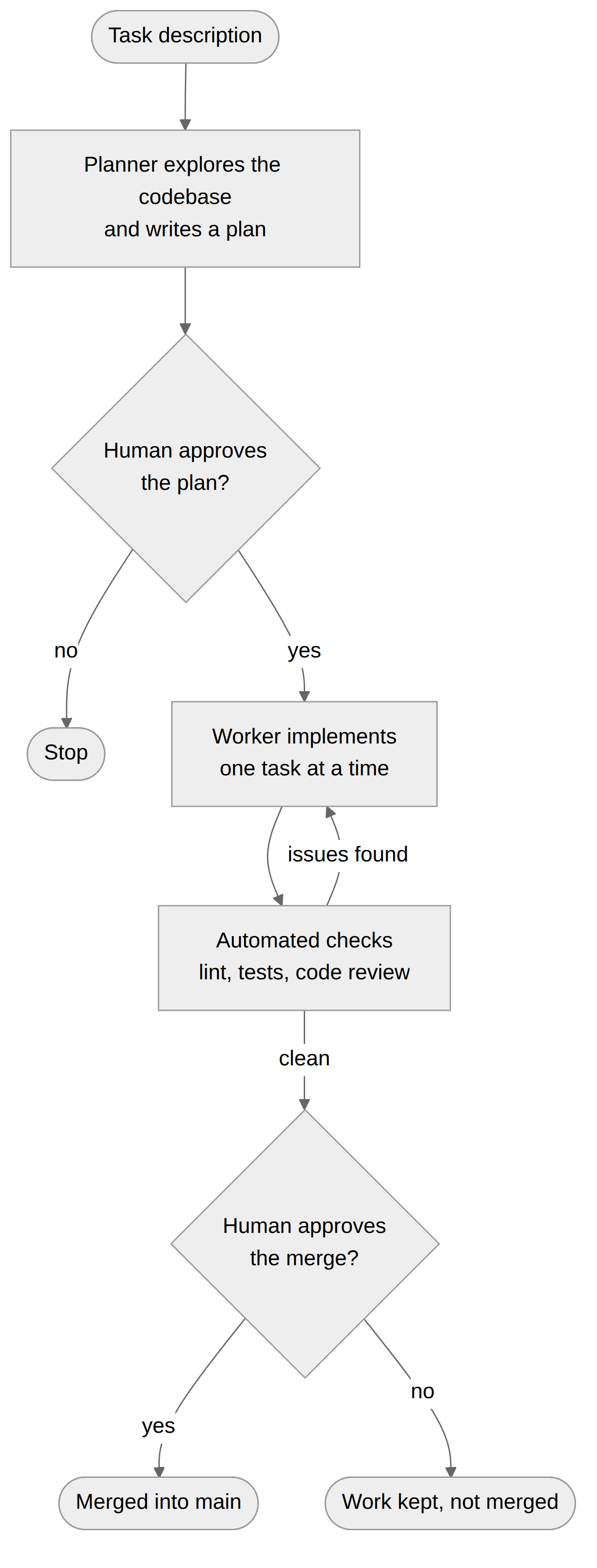
The process consists of several steps resembling my own pipeline I use when writing code. Some of the steps use AI Agents while others use scripts. Below are the descriptions of the steps.
The coding agent takes the task instruction and implements the task using the worker AI agent defined in worker.md
file. The agent definition describe where to find relevant information, see Memory section below, and
instructions to follow.
The sensors give feedback on the new code created by the worker. They check whether the codes compiles, if there are any linting errors, the tests should pass with defined minimal code coverage. It’s following the principal of doing cheap checks first, i.e. don’t run tests until all linting issues have been solved. The checks are quick and local, and any non positive results are given back to the coder agent to fix, then the loop starts again. To ensure that the loop don’t spin in eternity and burn tokens there is a max retry limit, currently set to two.
Next the review agent, as defined in reviewer.md file, reviews the code. It’s a new agent with a fresh session using a
different model that has instructions to review the diffs of the changed code against the task at hand. The review
comments are fed back into the coder agent to address. There is a maximum of two review rounds, again to manage token
usage and cost.
The resulting code is committed to a branch in a git work-tree. And work on the next task in the plan is started.
When all the tasks are done I will review the changes locally before I merge the change. In the future the step would instead be to create a PR for team members to review instead of merging into main.
The pipeline with the worker-planner model is quite straight forward. There are a few supporting tools needed to make the work run smoothly. The agent should work in a secure, predictable and cost effective way.
To be able to use the harness consistently in a unified way over many project I have a bootstrap process. The bootstrap
configures the project for this agentic workflow, copying the relevant files such as agents.md,
.claude/settings.json and updating the .gitignore among other things.
The bootstrap command leaves the project ready for agentic work following the process described above.
If the agent had to ask for permission of every action it needed to perform it can’t run unattended. To mitigate the
risk when the agent runs with full permissions some kind of sandbox environment was needed. I chose git work-tree as it
provided enough protection for my use case. The agent works in a git work-tree, i.e. in a branch in a different folder
from main. This together with .claude/settings.json and claude/hooks to catch forbidden commands such as
git push --force or sudo. This gives a reasonable security to protect the project, but it’s not a full process
protection.
To be able to start each session fresh I need a way for the session to quickly build up the context needed to solve the task at hand. It is important with this harness since a different worker agent used for each task in the build as well a fresh agent for each review. The agent needs to understand its surroundings (existing code), previous decisions and learnings and the current state of the project. The simplistic way of accomplish this is to send in all the code together with the full work log (what has been done) which creates a massive context using up a lot of tokens. As context becomes big the models will start to ignore parts of the context increasing the risk for hallucinations. And as the context grows I noticed a cost increase per task, before adding a memory structure, as more tokens are used for each request.
Instead I set up a memory folder where the agent can look up the information it need. I used a lightweight version of Google’s Open Knowledge Format (OKF). OKF is basically a structured way to organize markdown files together with index files. This helps the agent figure out where to find information as it builds the context. Memory is checked in together with the code, hence allowing different harnesses and models to find the information needed in the repo. A developer checks out the repo including the memory and AI agents definitions containing instructions how to use the memory. The plan will for example contain information about what memory (concepts) are relevant for a tasks.
Another type of memory is project documentation such as Architectural Decisions records (ADR’s). I have given the agent instructions to create an ADR when it makes an architectural decision that will affect future work. Memory files can refer to ADR’s when needed or other project documentation.
How can I tell if the harness is actually efficient at finishing tasks? I want to be able to evolve and refine the harness and hence I need insights and data on how the harness performed. Collecting information on cost I could see that the introduction memory reduced cost and time taken for tasks. At times I had to go back to the logs to figure out why the agent did what it did and to use that information to update the agent instructions. The logs can also be used by the agent to evaluate itself to find improvements.
When I started out I wanted to have a model proxy that depending on the task at hand selected an appropriate model, i.e. for big advanced thinking Sonnet 5 or similar and for easy tasks such as documentation Haiku. I even wanted to select between vendors and hosting, to run some tasks on a local model. That’s still something I want to explore, either build or find an existing tool.
I selected to include the model to use in each agent definition ( in /agents ). It makes sense since the agent has a
clear purpose and goal, so it was quite easy to select appropriate models for the different tasks. Also makes it easy to
test different models for tasks by updating the agent definition.
I bootstrapped the harness to a project folder, it added memory structure, agent instructions, Claude settings and hooks to the project. Then ran the first prompt to create a new go lang project from scratch (a cli task management tool). See example below. This shows how it’s possible to roll out a structured harness to an organization to achieve alignment and unify the work with AI agents for writing code. It can even be part of project templates in Backstage for example.
Before that I had started to use the harness to build and update itself. As I added the rigor of the coding pipeline i
noticed higher test coverage, smaller methods and small improvements on code quality on each iteration. I also found a
few bugs, for example agents.md had instructions to always run linting and tests, which had the effect that the
linting and tests were run twice, fixed by updating the agent instructions. This highlights a benefit of actually
codifying the sensors in the loop. It’s not an agent decision to run them, it’s now part of the process and I know that
tests are always run. Adding the gates with code health I could see the methods shrink in size. Having test coverage
requirements to 100% on new code meant code coverage of the project was improving.
Example:
$ agent bootstrap /Users/nils/source/task-cli --lang go
Warning: /Users/nils/source/task-cli is not empty. Skipping existing files.
  created AGENTS.md
  created memory/status.md
  created agents/architect.md
  created .claude/agents/architect.md
  created agents/planner.md
  created .claude/agents/planner.md
  created agents/refactor.md
  created .claude/agents/refactor.md
  created agents/reviewer.md
  created .claude/agents/reviewer.md
  created agents/worker.md
  created .claude/agents/worker.md
  created CLAUDE.md
  created mise.toml
  created sensors/lint.sh
  created sensors/test.sh
  created .claude/settings.json
  created .claude/hooks/block-destructive.sh

Done. Project ready at /Users/nils/source/task-cli
Next: edit AGENTS.md with project-specific conventions, then run the planner.

$ agent loop <prompt>

============================================================
PLAN: plan.md
============================================================
# Plan: CLI task tracker v1

## Context

This is a greenfield Go project. The agent ha .......

Approve this plan? [y/n/f (feedback)]: y

....

[worker:start]  Task 2/3: **CLI dispatch and integration tests** — Implement the `run()` entry point that
[worker:done]   Task 2/3: OK ($1.1421) — "Implemented `run()` CLI dispatch (add/list/done) in `cli.go`, wired `main.go` to it via `TASK_FILE`, added full integration test coverage in `cli_test.go`, and committed to the correct git worktree after catching that initial edits had landed in the wrong checkout."
[sensor:start] Task 2/3: Running sensors (lint.sh, test.sh, lsp.sh)...
[sensor:done]  Task 2/3: OK (passed on 1st attempt)
[code-health:start] Task 2/3: Running code health checks (lizard)...
[code-health:done] Task 2/3: OK (0 findings on 1st attempt)
[review:start] Task 2/3: Running adversarial review (reviewer)...
[review] Task 2/3: changes requested (attempt 1/2).
[worker:corrective] Task 2/3: Applying reviewer correction...
[sensor:start] Task 2/3: Running sensors (lint.sh, test.sh, lsp.sh)...
[sensor:done]  Task 2/3: OK (passed on 1st attempt)
[review:start] Task 2/3: Running adversarial review (reviewer)...
[review] Task 2/3: changes requested (attempt 2/2).
[worker:corrective] Task 2/3: Applying reviewer correction...
[sensor:start] Task 2/3: Running sensors (lint.sh, test.sh, lsp.sh)...
[sensor:done]  Task 2/3: OK (passed on 1st attempt)
[review:start] Task 2/3: Running adversarial review (reviewer)...
[review] Task 2/3: review budget exhausted (2/2) — committing with outstanding critique.
[commit] Task 2 committed ([agent/20260821-080958 dbe0560] Task 2: **CLI dispatch and integration tests** — Implement the `run()` entry point that).
[metrics] Task 2/3: 6 driver call(s), $1.8082, session a63e297a-4122-4302-ae55-9f264193f1c4

.....
I wanted to show that there is a better way than just handing out Claude licenses and leaving the engineers to figure things out. A structured process built into the agent, plus a bootstrap command that carries it to any project, gives one place to manage both process and configuration, arriving at a codified and unified way to work with agents. And allowing the engineers to explore how to work with agents with more confidence.
Earlier I pointed to The new team and the idea of treating agents as team members. By creating a harness to give agents the same feedback loops and guardrails as regular team members, the code becomes more sustainable, i.e. code that can grow with the product.
Building this harness has taught me that I can achieve better coding rigor and quality by giving the agents feedback loops, a combination of deterministic scripts for linting, testing and code quality and having other agents giving feedback.
You don’t need the whole harness on day one. Start with one process step that is part of your workflow; codify it and make it available to the agents and see what’s happen.